![[personal profile]](https://www.dreamwidth.org/img/silk/identity/user.png) ewx
ewxFurther to my remarks on Leopard one of the reasons for buying it was to add a Windows partition to my Mac via Boot Camp.
Boot Camp comprises a partitioning tool, support for dual boot and a collection of drivers (on the Leopard install disk) for running Windows on Apple hardware. You need an Intel Mac and a sufficiently recent copy of XP or Vista. In this version only 32-bit software is supported even though I have a 64-bit CPU, but I hear that more recent Macs are shipping with 64-bit capable Boot Camp. 64-bit operation isn't particularly important for what I current want out of Windows anyway (games and the odd bit of software development).
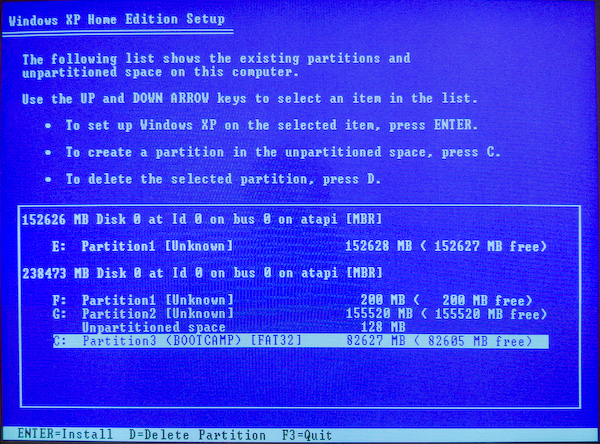
Partitioning was perfectly easy. On booting into the Windows XP installer the keyboard didn't work initially; after I unplugged my USB card reader and rebooted it was OK, however. I'm not sure if this is Apple's bug or Microsoft's but it seems to be a common problem.
The network setup decided to apply the address I gave it to the firewire port rather than either of the ethernet ports. I disabled the firewire port (under windows) and the non-connected ethernet and it was happier. (As with my Windows/Linux dual-boot system) I'd given the Windows partition a different name and address to the MacOS partition.
SHIFT 3 on my UK keyboard produces £, which is not what I wanted; I type # much more often than £. Under Mac OS I was able to select a US keyboard layout but Windows doesn't offer me a US Apple layout (and the US layouts it does have have other keys in the wrong places).
Here's what I did to get around this:
- Install the keyboard layout creator from http://www.microsoft.com/globaldev/tools/msklc.mspx and run it
- Load the Apple UK layout
- Change £ to # and vica versa, using CTRL+ALT+3 to type #
- Select Project->Properties and edit the name etc
- Select Project->Test Keyboard Layout to make sure it works
- Save the source file
- Selected Project->Build DLL and Setup Package
- Quit the layout creator
- Install the new layout package
- Go to Control Panel->Regional And Language Options->Languages and make the new keyboard layout the default
Rather surpringly the choice of keyboard layout doesn't seem to be reachable via Control Panel->Keyboard.
I installed the following things without any difficulty:
- PuTTY
- Firefox
- Windows updates (needed 2 restarts)
- IE7
- Starcraft and Brood War
- Rome: Total War
- Warcraft III
- Visual C++ 2008
- RealVNC
- DirectX SDK (March 2008)
Half Life said it didn't like my OS (it predates XP by some years) and needed a patch, but after rather fruitlessly poking around the web for the right thing (which used to be on Sierra's website but isn't any more) I installed Opposing Force and it installed a patch and ran OK anyway.
(no subject)
Date: 2008-03-15 04:29 pm (UTC)Я люблю ⌘.
(no subject)
Date: 2008-03-15 04:33 pm (UTC)I think the distinction only being #/£ is an Apple-ism; I believe US PC keyboards differ more than that from UK PC keyboards. (Certainly UK Apple and PC keyboards differ from one another.)
My fingers don't necessarily know where a given key is on the keyboard they're using right now but if they don't their second guess is almost always right.
(no subject)
Date: 2008-03-15 04:51 pm (UTC)(no subject)
Date: 2008-03-15 05:55 pm (UTC)find out how...
Date: 2008-03-16 10:20 am (UTC)(no subject)
Date: 2008-03-15 08:26 pm (UTC)This means I tend to end up accidentally hitting Return when using a US layout, which is a particularly irritating missed first guess because it often has actual consequences...
(no subject)
Date: 2008-03-15 04:50 pm (UTC)(no subject)
Date: 2008-03-16 10:23 am (UTC)(no subject)
Date: 2008-03-15 10:19 pm (UTC)(no subject)
Date: 2008-03-16 03:19 am (UTC)(no subject)
Date: 2008-03-16 10:00 am (UTC)(no subject)
Date: 2008-03-16 10:22 am (UTC)